

Introducing Subscription Plans — Free, Pro, and Ultra
Auto QC now has three tiers: Free, Pro, and Ultra. We shipped with a single plan because it kept things simple — but it became clear pretty quickly that a solo editor and a post facility running daily deliveries need different things.
All 15 checks are available on every plan. What changes is how much you can run per month, how much storage you get, and whether you need things like priority queuing or API access.
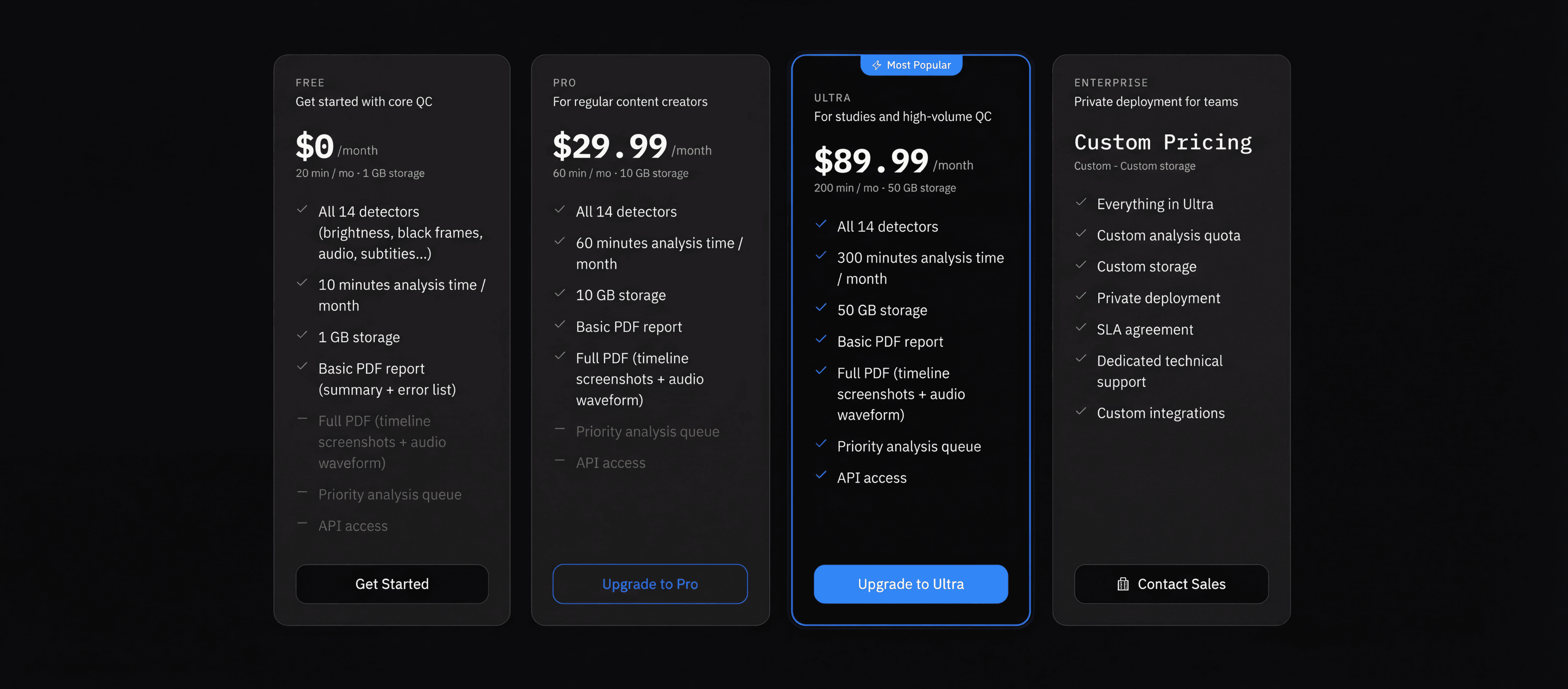
What's in each plan
Free
$0
10 min / month
1 GB storage
- All 15 checks
- Basic PDF report
- Timeline annotations
- Full PDF report (screenshots + waveforms)
- Priority analysis queue
- API access
Pro
$29.99/mo
60 min / month
10 GB storage
- All 15 checks
- Basic + Full PDF report
- Timeline annotations
- Priority analysis queue
- API access
Ultra
$89.99/mo
300 min / month
50 GB storage
- All 15 checks
- Basic + Full PDF report
- Timeline annotations
- Priority analysis queue
- API access
Managing your subscription
Settings → Subscription is a live counter. It shows your plan, how many minutes you've used, and how much storage you've consumed. Worth checking before you kick off a big batch of uploads.
“Manage Subscription” opens the Stripe portal — change your plan, update a card, or cancel. Cancellations take effect at the end of your billing period, not immediately.
Billing & invoices
Every payment generates a PDF invoice, listed under Settings → Billing with date, amount, and invoice number. A few beta testers asked for this specifically; turns out it matters quite a bit when you're recovering costs from clients.
We don't touch your card details. Stripe handles payment, retries if something fails, and notifies you if action is needed.
How to upgrade
- 01Go to the Pricing page and compare plans.
- 02Click Upgrade to Pro or Upgrade to Ultra.
- 03Stripe Checkout handles the rest.
- 04Your quota updates the moment payment clears — no waiting for a system sync.